Prerequisites
Overview
Keep in mind that these are soft prerequisites; as long as you are willing to learn these skills when needed, you should be fine.
- Experience in an imperative programming language (C, C++, Java, Python, etc.). The course will be primarily taught in Python, so familiarity is encouraged. However, confidence in another language will suffice, as no specific Python features will be important.
- Knowledge of basic programming in any assembly language.
- Knowledge of linked lists, trees, basic hash tables, and their traversals.
- Knowledge of Git.
- Provided course materials assume compilation to a Linux target, so usage of Linux in some capacity
is required, unless students choose not to use the project base.
This can be a physical Linux machine, the
cs1.utdallas.eduserver, Windows Subsystem for Linux, etc.
Below is more detail on each of these prerequisites.
Imperative Programming
Since this course is focused on compiling an imperative programming language, knowledge of at least one imperative programming language is assumed. Writing the code necessary for this course will require use of the following language features:
- Conditionals
- Loops
- Functions
- Simple classes or structures
If following along with the ECCO compiler project base, familiarity of the C programming language is encouraged. C is relatively simple and is very low-level, great for a first compiler. Though it is a very old language with some “outdated” aspects (at least, in my opinion), it is still very popular today due to the extremely high level of control the programmer has over the code.
Basic C Syntax
If you have programmed in Java or C++, the syntax of C will look very familiar to you. Here is a snippet demonstrating some very basic C:
// This is a forward declaration of `my_function` so we can use it in `main` without defining it first.
void my_function(int*);

// Define a global variable with the value 10.
int global_x = 10;

// The `main` function name denotes the entry point of the program.
int main() {
    // Define a local variable with the value 3.
    int local_x = 3;
    // If/else statements conditionally execute code.
    if (/* A */ global_x > 15) {
        // Executes if A is true; B is never evaluated
    } else if (/* B */ global_x > 12) {
        // Executes if A is false and B is true
    } else {
        // Executes if A is false and B is false
    }
    // This conditional statement has no alternative, so if the condition is false, the statement is skipped.
    if (global_x == 10) {
        // Call `my_function` with a pointer to `global_x` using the address-of operator.
        my_function(&global_x);
    }
    // While loops check their condition before the body of the loop runs.
    // - If the condition is true, the body is executed and then the condition is checked again.
    // - If the condition is false, the body is *skipped* and the next line of code is executed
    while (local_x < 10) {
        local_x = local_x + 2;
    }
    // Return 0 to indicate that the program finished with no errors.
    return 0;
}

void my_function(int* x) {
    // Since `x` is a pointer to an int, dereference it with the dereference operator to access the value pointed to.
    *x = *x + 5;
}
Assembly Programming
ECCO will compile C to LLVM-IR, a pseudo-assembly language that is optimized by the clang compiler.
It is very different from common platform-specific assembly languages like x86, ARM, or MIPS, but is
grounded in similar concepts:
- Registers
- Instructions
- Jumps
- Stack Memory
Registers
Registers are, in essence, a CPU’s working memory. They store data temporarily for the CPU to operate on. They are the most efficient way of storing data, but the number of registers in a CPU is limited.
Some registers are general-purpose, so they can be freely used for arbitrary calculations. On the other hand,
some registers serve a particular purpose, such as the MIPS $zero register, which is read-only and always
contains the integer 0. Many platforms also have registers for the program counter and stack pointer.
Registers in LLVM-IR, unlike true registers, are more of an abstraction. They are unlimited in number and are immutable, meaning whenever a register is created with a certain value, that value can never be changed.
Instructions
Most programming languages allow you to do multiple operations at once, including C. For example, a simple
dot product could be written as x = (a * b) + (c * d).
However, in order for computers to be able to perform this task, it must do it one step at a time. Instructions are the simple steps the computer takes in executing a program, operating on registers and/or constant values. Each instruction has a mnemonic or acronym to identify it, though they vary by platform.
So, the above expression might look more like this in LLVM-IR:
%0 = mul i32 %a, %b ; "mul"tiply %a and %b, store result in %0
%1 = mul i32 %c, %d ; "mul"tiply %c and %d, store result in %1
%x = add i32 %0, %1 ; "add" %0 and %1, store result in %x
Jumps
In high-level programming, we are very familiar with structures like loops and if-else statements.
These abstractions don’t exist in assembly code; instead, “jumps” (also called “branches”) dictate
the order of execution of instructions. Accompanying jumps are “labels,” which can be thought of as
landing pads for jump instructions.
For example, here is a simple conditional statement in C:
if (x > 100) {
    // thing 1
} else {
    // thing 2
}
And the equivalent code in LLVM-IR:
    %condition = icmp sgt i32 %x, 100 ; store 1 in %condition if %x > 100, 0 otherwise
    br i1 %condition, label %true_label, label %false_label ; jump to a label depending on the value of %condition
true_label:
    ; thing 1
    br label %end_label ; skip to after the statement
false_label:
    ; thing 2
    br label %end_label ; skip to after the statement
end_label:
As an example of a loop, here is a very simple infinite loop:
loop_label:
    ; do something
    br label %loop_label ; go back to the beginning of the loop
Notice that there are two types of jumps: conditional jumps and unconditional jumps.
Conditional jumps look like br i1 %condition, ..., and jump to one of two labels depending on the value of %condition.
Unconditional jumps look like br label ..., and always jump, as the name suggests.
Stack Memory
In the Registers section, I mentioned the idea of a “stack pointer.” The “stack” refers to a region of memory intended for use by functions. It serves as storage for values which can’t fit in registers. Additionally, when a function is called, the contents of the registers are usually saved to the stack, allowing the called function to use the same registers without consequence.
In a high-level language, functions can be called inside each other, meaning the stack has to allocate space for a function when it is called. This space is the “stack frame” for the function. The stack pointer is used to keep track of these stack frames by pointing to the end of the last frame on the stack.
This is why infinite recursion usually causes a “stack overflow.” Each recursive call pushes a new frame to the stack, and because the stack has a fixed upper limit, it will eventually run out of space to hold more stack frames, thus causing an overflow.
Data Structures
Linked Lists
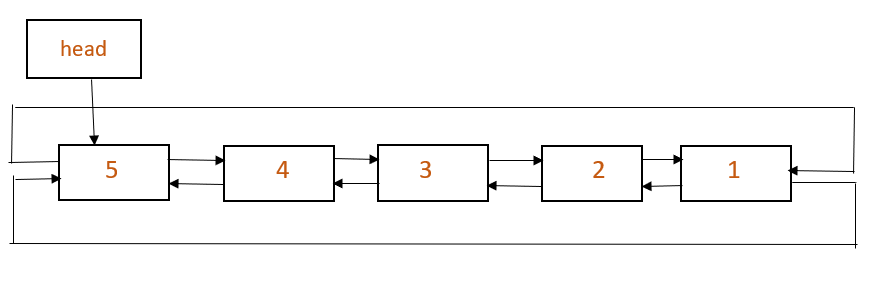
A linked list is a (usually) bidirectional network in which each node has exactly 0 or 1 child nodes (successors) and exactly 0 or 1 parent nodes (ancestors).
Trees
A tree is an oriented, (usually) bidirectional, hierarchical network of parent and child nodes. This means that there exist a set of nodes, some who are parents of multiple other nodes. A node can only be the child of one parent. This image is of a ”ternary” tree (each node can have up to 3 children).
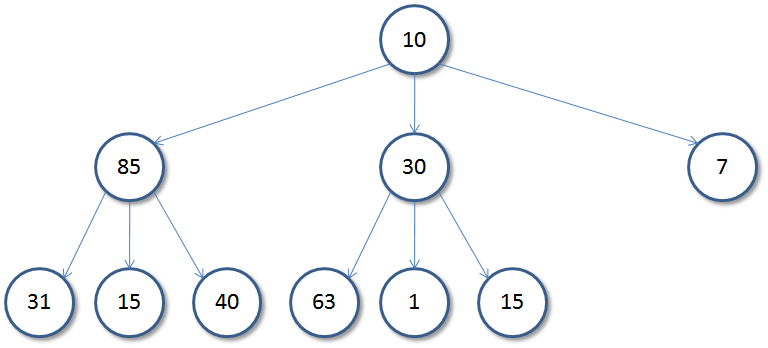
”Traversal” of a tree describes a set of algorithms that move around the tree network and perform operations using the data stored at each node and the relations between nodes. For our cases, traversal algorithms will visit every node in the tree.
The two primary tree traversals are Breadth-First Traversal (BFS) and Depth-First Traversal (DFS).
DFS of the above image: 10 85 31 15 40 30 63 1 15 7
BFS of the above image: 10 85 30 7 31 15 40 63 1 15
Hash Tables
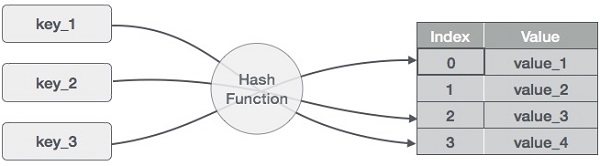
A Hash Table is a key-value-type structure in which keys are passed through a ”hash function”, a one-way encryption scheme that takes in various kinds of data and outputs an integer that represents the row index of corresponding data (values) in the table. Values can be any kind of data, including a Linked List (we will utilize this tactic later).
Git
If this will be your first time using Git, I am excited to welcome you into the next phase of your career as a software developer. Git is arguably the most impactful software development tool since the first text editor was designed.
Git is a versioning system, allowing you to track changes in your source code over time. This is helpful if you need to make a mistake and revert to a version of your code that works, or to see where bugs were introduced in the past.
Usage
Your “working directory” consists of the compiler source code and whatever other files are adjacent to it. Any changes performed in the working directory are temporary and can be reverted after a warning.
The “staging area” is where you temporarily put your changes when you’re
almost ready to cement them. This is accomplished by running the
command git add [list of filenames you want to add to
staging area, separated by spaces].
When you’re ready to cement your changes, you can run git commit -m
"[descriptive message of your major changes]". These will add
your changes to the “committed files” area of the repository. Commits can
be altered after running git commit, but it’s non-trivial, so you can treat
this as a permanent action for most intents and purposes.
Remote Usage
It’s often a good idea to back up your Git repository to an external server. It protects your code and enables collaboration with others. This can be done using a service like GitHub or Gitlab. These websites let you remotely host Git repositories.
If there are changes on your local repository that you want to add to the
remote repository, you can run git push origin main. Here, origin
is the standard and default pseudonym for any remote server that hosts Git
instances. Also, main is the name of a “branch”.
Git lets you split your development across multiple versions of your code (branches) at the same time. These branches can be merged together such that multiple people can work on disjoint parts of the software in tandem and then combine their work with a deterministic way to resolve any conflicting changes they might have made. You likely won’t need to work on multiple branches for this course.
Unix and Bash
You should know the very basics of Unix usage, such as how to run Bash
scripts. Our ECCO project base has a scripts file, which takes arguments
to perform different actions. For example, ./scripts run test_file
will start up our compiler and pass in a file called test_file to it, then
execute the generated assembly code.
./scripts all test_file will format and lint your compiler source
code, and then compile and execute test_file.
If you do not have access to a Unix-based machine (you do if you’re a UTD student!), I expect that you understand Docker well enough to use the provided Dockerfile in a Windows environment to run your code. Or, I expect that you can set up WSL and use it accordingly.
Questions?
If you have a question that wasn’t answered by this page, feel free to send me an email or ask me about it during class.